


Frameit Video Editor
4.326.00 Reviews
App Specs
- Version
- 1.07.2
- Updated On
- License
- Free
- Downloads
- 50,000+
- Developer
- FIGABYTE SOLUTIONS d.o.o.
- Categories
- Video Players & Editors
- Platform
- Android
Screenshots
 Analysis by AppCompare
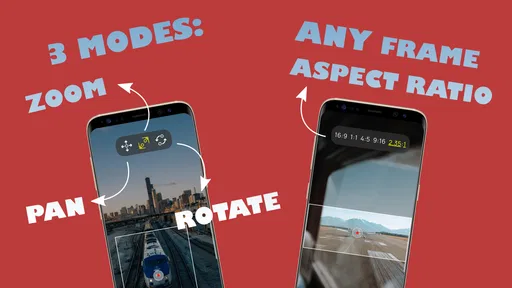
I like video editors that solve one clear problem well, and Frameit Video Editor takes that approach. Instead of trying to replace a full desktop editing suite, it focuses on giving still images and video clips a sense of movement through pan, zoom, and rotation effects. That makes it interesting for short social posts, photo montages, simple presentations, and anyone who wants a more lively result without learning a complicated timeline.
I tested it with the mindset of an everyday phone user rather than a professional editor. The main question was simple: can I turn ordinary visual material into something that feels intentionally animated without spending a long time adjusting controls? My answer is mostly yes, although the app’s narrow focus matters. It is best understood as a movement-focused editor, not an all-purpose production tool.
Frameit Video Editor is a free app in the video players and editors category, made by FIGABYTE SOLUTIONS d.o.o. It is available for Everyone and runs on Android 7.0 or later. The current version is 1.07.2, and the app has passed the early trial stage with over 50 thousand installs, a 4.3 average from around 385 ratings, and about 26 written reviews.
What the editing experience feels like in everyday use
The appeal becomes clear when I start with a photo rather than a video. A single image can feel static in a slideshow, especially when several images appear one after another with no visual variation. A controlled zoom toward a face, a slow pan across a landscape, or a slight rotation can make that same image feel like part of a sequence.
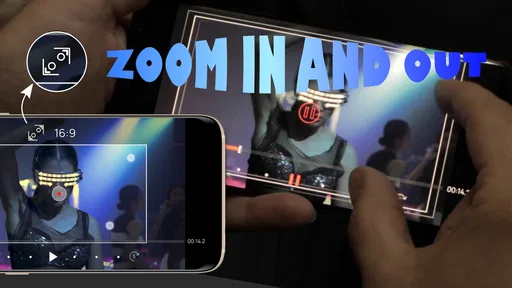
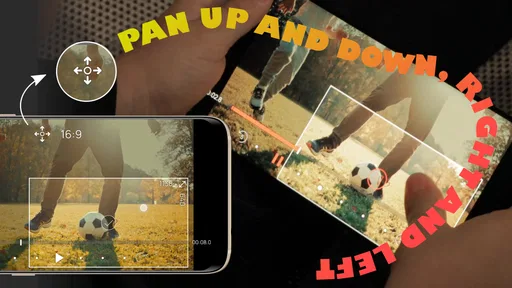
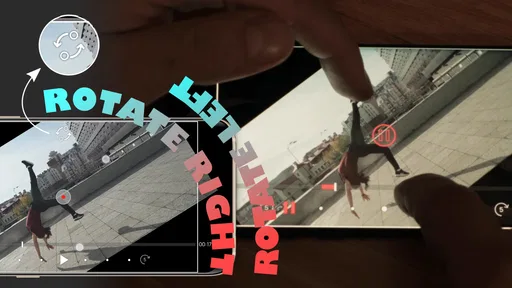
The three central effects are easy to understand. Panning changes the visible area across the frame, zooming changes the apparent distance, and rotating tilts the image as it moves. Used separately, each effect can be subtle. Used together, they can create a camera-like motion that gives a still picture more energy.
I found the best results came from starting with restraint. A small zoom over a portrait usually looks more polished than a dramatic rush toward the subject. A horizontal pan works well for a wide landscape, while a vertical movement suits a tall building or a full-body photograph. Rotation is the effect I would use most carefully because even a modest tilt can make a clip feel playful or unstable.
This is also where the app differs from the usual full-featured mobile editors. Those alternatives normally offer trimming, transitions, text, music, filters, layers, and many export choices in one place. Frameit’s value is more specific: it puts motion treatment at the center instead of making it one small option among dozens. If you already know exactly how you want a photo or clip to move, that narrower design can feel less distracting.
Worth Reading Before You Choose

EA SPORTS FC Mobile 26 Is a Bigger Football Game, but It Takes Time

Flipboard Shows What News Apps Must Do Beyond the Feed

Switching to Android Auto Means Rethinking Your Driving Routine

Google Calendar Makes a Crowded Week Easier to Manage

Ludo King Makes the Most of the Minutes Between Plans

Baby Panda World Brings Quick Play to Modern Phones, but Its Game Library Feels Busy
Why the focused controls can be useful
A focused editor is helpful when the source material is already prepared. Imagine making a short birthday montage from a folder of family photos. I would not need a complex multi-track project just to make each image gently move for a few seconds. I could concentrate on framing, choose a movement direction, and keep the visual style consistent across the sequence.
The same workflow suits a small business owner preparing a product post. A close-up of a handmade item can slowly zoom toward its most important detail. A second shot can pan across the full product. A third can rotate slightly to create a transition in mood. The result may be more engaging than a sequence of untouched images, without requiring advanced animation knowledge.
There is a useful trade-off here: fewer editing distractions can mean faster decisions, but fewer tools also mean more work elsewhere if your project needs titles, sound design, precise cuts, or layered graphics. I would use this app to create movement, then move to another editor if the project needed a complete finishing pass.
Getting better results from the frame itself
The effect cannot rescue a poorly framed source. Before adding movement, I would check where the subject sits and whether the edges contain unwanted empty space. A zoom may reveal a distracting background detail, while a pan can move the subject out of view if the starting and ending positions are chosen carelessly.
One practical technique is to leave visual breathing room in the direction of travel. If a person is looking toward the right side of a photograph, panning slightly in that direction can feel natural because the viewer sees where the subject appears to be looking. Moving the frame against the subject’s gaze can create tension, but it should be a deliberate choice rather than an accident.
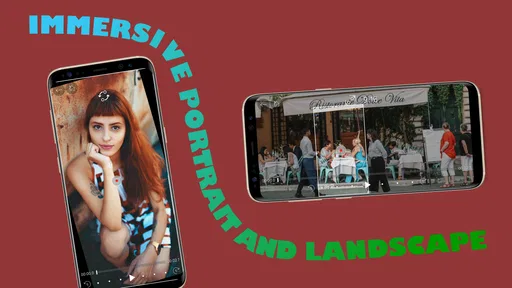
For landscape images, I prefer a slow movement along the widest available area. For portraits, a gentle push toward the eyes or face usually has more impact than rotating the whole image. For screenshots or documents, I would avoid strong rotation altogether and use a measured zoom so the information remains readable.
A realistic phone scenario
Suppose I am leaving a weekend trip and want to post a short recap from my phone. I have several landscape photos, a few portrait shots, and one short video. With Frameit Video Editor, I would give the landscape images a slow side-to-side movement, use a mild zoom on the portraits, and reserve rotation for a single transition rather than every item.
The important part is consistency. If every image zooms at a different speed or moves in a different direction, the montage can feel random. I would choose one dominant style, preview the sequence, and remove any effect that competes with the subject. This is one of the app’s less obvious lessons: the strongest result often comes from using less motion, not from showing every available effect.
For a quick social post, that workflow is more approachable than opening a large editor filled with tracks and panels. For a longer travel video with spoken narration, captions, music, and carefully timed cuts, I would switch to a broader editor. Frameit is a good first step for visual motion, not necessarily the final destination for every project.
Where the app may feel limited
The same simplicity that makes the app approachable can become restrictive. Users who expect a complete mobile studio may look for tools that are outside this app’s central purpose. If your project depends on detailed audio editing, multiple video layers, animated text, chroma-key work, or frame-accurate storytelling, a conventional full editor will probably be a better fit.
I would also be cautious about applying movement automatically to a large batch of images without reviewing each result. A preset that looks good on a landscape may crop a portrait awkwardly. A movement that works on a centered subject may hide an off-center subject. The app can make animation easier, but it does not remove the need for visual judgment.
Another point is that motion effects can exaggerate low-quality source material. A strong zoom may expose softness, compression, or noise that was less noticeable in a still image. When I want a clean result, I start with the best original file available and keep the movement moderate. This is especially important when the finished video will be viewed on a larger screen.
Cost, access, and practical expectations
The app can be installed free of charge, which makes it easy to try before deciding whether it belongs in your regular workflow. Optional in-app purchases range from $1.49 to $21.99 per item. I would treat that range as a reason to inspect the purchase screen carefully before confirming anything, particularly if I only need a simple personal project.
That free entry point is useful for casual users who want to experiment with animated photos without committing to a subscription-based editing setup. At the same time, the value of any optional purchase depends on how often you create this type of content. Someone who makes one montage every few months may find the free experience sufficient, while a frequent creator may judge the additional options differently.
The Everyone age rating also makes the app approachable for general household use. That does not mean every editing decision is automatically suitable for every audience, but it does make the app feel appropriate for ordinary personal projects, school presentations, family videos, and simple social content.
Trust, controls, and what I would check before using it
When I install a small editing app, I pay attention to more than the visible effects. I look at the permission prompts, the purchase flow, and whether the app gives me clear choices before I select media or confirm a transaction. Those moments tell me more about practical trust than a polished feature screen does.
With this app, I would review every permission request in the Android settings and grant only what is needed for the task I am doing. If I am working with a few selected photos, I prefer choosing those files rather than giving broader access to my entire library when the operating system offers a narrower option. I also keep an eye on whether a permission is requested immediately or only when I use a related function.
I would not place highly sensitive material into any mobile editor casually. Personal identity documents, private medical images, confidential work footage, and unreleased business material deserve extra care. Before importing them, I would read the app’s current privacy information and check the device’s permission panel. That is not a criticism unique to Frameit; it is a sensible habit for any tool that handles personal media.
The most trustworthy workflow is one where I stay in control of the media, permissions, and purchases at every step. I would preview the selected files, confirm the intended output, and avoid tapping through prompts quickly. If the app presents an optional purchase, I would read what it unlocks and verify the amount before using the device’s confirmation control.
How it compares with familiar alternatives
Compared with a standard gallery slideshow, Frameit offers more expressive movement. A gallery app may be faster for simply viewing pictures, but it usually gives me less control over how the frame travels. For a polished visual sequence, the dedicated movement controls are the stronger choice.
Compared with a full mobile video editor, Frameit is easier to approach when the project is built around pan, zoom, and rotation. I spend less time searching through unrelated tools. The compromise is obvious: the broader editor wins when I need audio, captions, complex timing, or several visual elements working together.
Compared with manually animating images in presentation software, this app is more direct for a video-oriented result. I would choose presentation software when the content is mostly slides, text, and speaker notes. I would choose Frameit when the visual material itself is the main attraction and movement is the detail that makes it feel finished.
That comparison helped me define the app’s strongest audience. It is not aimed at people who want every possible editing function. It is for users who have a visual idea such as “slowly reveal this photo” or “move across this image” and want to turn that idea into a shareable result without building a complicated project.
Who should use it, and who should skip it
I would recommend it to casual creators, families making photo videos, students preparing visual assignments, small sellers presenting products, and social media users who want more life in static images. It is also a reasonable option for beginners who find large editing interfaces intimidating.
I would skip it as my main editor if I regularly produce interviews, music videos, tutorials, narrated explainers, or multi-scene projects. Those formats benefit from timeline precision, audio tools, text controls, and layered editing. A focused motion editor may still help with one part of the process, but it would not replace the broader toolkit.
I would also skip it for projects where exact brand consistency is critical unless I can verify that the available controls match my requirements. A professional workflow may need repeatable timing, precise numerical settings, saved templates, or detailed export control. I would test a small sample first rather than assume that a simple interface provides those deeper controls.
My cautious verdict after using it
Frameit Video Editor succeeds because it has a clear identity. It makes pan, zoom, and rotation the center of the experience, and that focus can turn an ordinary photo sequence into something noticeably more engaging. I especially like it for short, visual projects where I want movement without the overhead of a full editing suite.
Its limitations are equally important. It should not be mistaken for a complete replacement for a professional mobile editor, and the best results still depend on thoughtful framing, restrained effects, and careful review of every image. Users should also make deliberate choices around permissions, private media, and optional purchases rather than treating any free editor as automatically risk-free.
For me, the decision is straightforward: I would install it when the project’s main challenge is making still images or simple clips feel dynamic. I would choose another tool when the project needs serious sound, layered storytelling, detailed captions, or advanced finishing. If that boundary matches your needs, this free app is worth trying, and its focused controls make it easier to create a polished first result than a crowded editor often does.
Pros
- Simple tools make quick video edits accessible to beginners.
- Supports creative overlays
- frames
- and visual effects for social content.
- Previewing edits is straightforward before exporting the final video.
- Useful for adding a polished look to short clips and personal projects.
- A focused interface helps users edit without unnecessary complexity.
Cons
- Some advanced editing controls may be missing for experienced creators.
- Export quality and available resolutions can vary by device or version.
- Effects and frames may feel repetitive without additional customization.
- Large projects can require considerable storage and processing power.
- The free experience may include ads or limits on certain features.
FAQs for Frameit Video Editor
What is Frameit Video Editor used for?
Frameit Video Editor is designed for creating and polishing short videos for social media, presentations, and personal projects. It typically lets you trim clips, arrange multiple pieces of footage, add music or text, and apply visual effects or frames. Its main appeal is providing a straightforward editing workflow for users who want attractive results without the complexity of professional desktop software.
Is Frameit Video Editor easy to use for beginners?
Yes, Frameit Video Editor is generally aimed at beginners and casual creators. The editing tools are organized around common actions such as importing media, cutting clips, adding overlays, and exporting the finished video. Users who have never edited before may still need a few minutes to understand the timeline and preview controls, but the interface is considerably less intimidating than advanced editors.
Does Frameit Video Editor add a watermark to exported videos?
Whether a watermark appears can depend on the version of Frameit Video Editor, the selected template or effect, and whether premium features are enabled. Before completing an important project, check the export preview and the application’s current pricing or upgrade information. Some free editing apps allow basic exports with branding while reserving watermark-free output for paid users or specific options.
Can I use my own photos, videos, music, and text in Frameit Video Editor?
Frameit Video Editor is intended to work with personal media stored on a compatible device, allowing users to build projects from their own photos and video clips. Text, frames, transitions, and other creative elements may also be available depending on the app version. Music support can vary, so confirm which audio formats and library permissions are supported before starting a larger project.
Is Frameit Video Editor free to download and use?
The application may be free to download, but some tools, templates, effects, export settings, or advertising controls can require an in-app purchase or subscription. The exact offer may differ between Android and iOS and can change with updates. Review the store listing and the purchase screen carefully, especially if a trial is offered, to understand renewal terms and available limitations.


